
How to Create a Telegram Invite Link for Member Orders?
If you want to buy Telegram members for a channel, group, or private community, the link you submit matters more than many beginners realize. A Telegram invite link is the access path that lets new users join your target chat. If the link is wrong, expired, limited, approval-based, revoked, or connected to the wrong group, your member order may stay pending, become partial, or get cancelled. 🔗
Before placing a member order through a Telegram smm panel, you should know whether your target chat needs a public Telegram username link or a private invite link. Public channels and groups may work with a normal t.me username link, while private groups and channels usually need a working invite link that allows new users to join without manual searching.
How to Create a Telegram Invite Link for Member Orders?
Direct answer: To create a Telegram invite link for member orders, open your Telegram group or channel, go to the chat profile or management settings, open the invite-link section, and copy an active link that allows new users to join. For member orders, the safest invite link is usually one that does not expire too soon, does not have a low usage limit, does not require manual approval, and stays active until delivery is completed.
A Telegram invite link is not just a small setup detail. For member orders, the link controls whether new members can actually access your group or channel. If you change the link during delivery, create a link with too few allowed uses, or use a join-request link without handling approvals, the panel may not be able to complete the order correctly.
This is especially important when ordering services like Buy Telegram Members, because member delivery depends on the target chat being joinable through the submitted link. A clean, stable invite link reduces avoidable order problems before they happen.
What Is a Telegram Invite Link?
A Telegram invite link is a join link that allows users to enter a Telegram group, channel, or private community. Public Telegram chats can use a username-based link such as t.me/username, while private chats usually require a private invite link that looks like t.me/+xxxxxxxx or another invite-hash format.
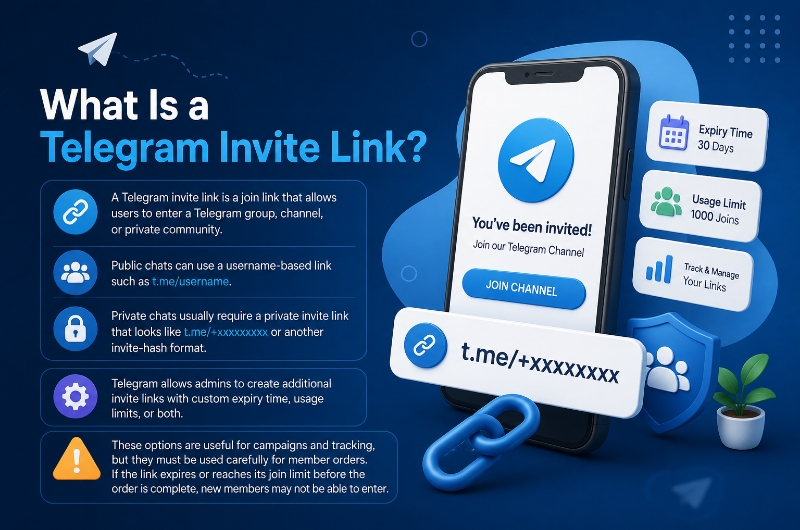
Telegram allows admins to create additional invite links with custom expiry time, usage limits, or both. These options are useful for campaigns and tracking, but they must be used carefully for member orders. If the link expires or reaches its join limit before the order is complete, new members may not be able to enter.
| Invite Link Type | Example Format | Best Use | Risk for Member Orders |
|---|---|---|---|
| Public username link | t.me/username | Public channels or groups with a username. | Low risk if the service accepts public links. |
| Private invite link | t.me/+xxxxxxxx | Private groups, private channels, or hidden communities. | Safe if active and not restricted. |
| Limited-use invite link | Custom invite with join limit | Campaign tracking or controlled access. | Risky if the limit is lower than the order quantity. |
| Expiring invite link | Invite with expiry time | Temporary campaigns or short events. | Risky if delivery takes longer than the expiry window. |
| Join-request link | Invite that requires admin approval | Controlled communities where admins approve each user. | Risky if approvals are not handled during delivery. |
Why Member Orders Need the Correct Telegram Invite Link?
Telegram member orders depend on access. If the panel or provider cannot open the target chat through the link you submit, delivery may not start. A wrong link, expired invite, revoked invite, private restriction, or approval-required join flow can block new members from entering the group or channel.
If you are trying to grow by country or audience type, the link setup becomes even more important. For example, when using buy telegram targeted members, the target link must stay stable while the order is being delivered, because country-focused delivery may need a longer or more controlled window than a simple instant test order.
| Problem | What Can Happen? | Better Setup |
|---|---|---|
| Expired invite link | New members cannot join. | Use a non-expiring or long-valid link. |
| Low usage limit | Delivery may stop after the limit is reached. | Set a limit higher than the order quantity or avoid limits. |
| Join request enabled | Members wait for manual approval. | Use normal join unless the service supports approvals. |
| Wrong chat link | Order may fail or go to the wrong target. | Open and verify the link before ordering. |
| Revoked during delivery | Order may become partial or cancelled. | Keep the link active until completion. |
Public Telegram Link vs Private Invite Link: What Is the Difference?
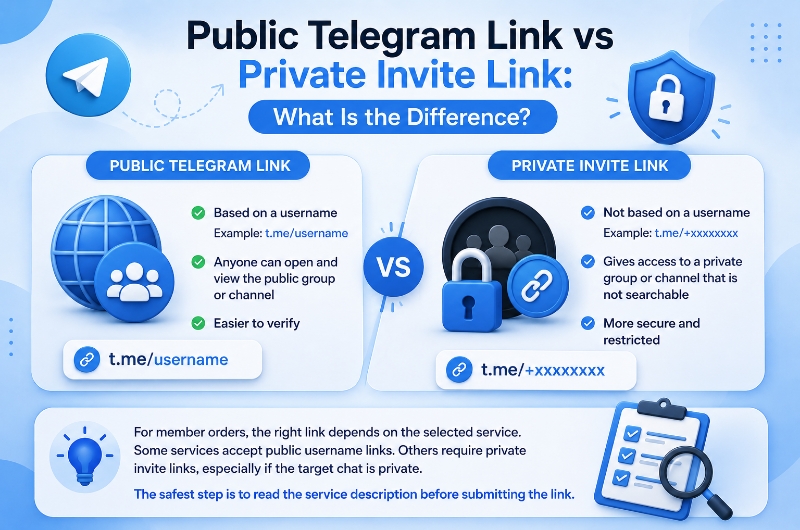
A public Telegram link is based on a username, usually in the format t.me/username. Public links are easier to verify because anyone can open them and view the public group or channel. A private invite link is different because it gives access to a private group or channel that is not searchable through a public username.
For member orders, the right link depends on the selected service. Some services accept public username links. Others require private invite links, especially if the target chat is private. The safest step is to read the service description before submitting the link.
When Should You Use a Public Telegram Link for Member Orders?
Use a public Telegram link when your group or channel has a public username and the selected member service accepts public links. Public links are usually easier to share, less likely to expire, and easier for support to check if a problem happens.
A public link is often useful for channels that also want better search visibility. If your goal is not only ordering members but improving Telegram visibility over time, the guide How to Rank in Telegram Search explains how public identity, username clarity, hashtags, engagement, and country relevance work together.
When Should You Use a Private Invite Link for Member Orders?
Use a private invite link when the target Telegram group or channel is private, hidden, restricted, or not accessible through a public username. In this case, the panel needs a working invite link so new members can enter without manually searching for the chat.
The private invite link should stay active during the full delivery window. If the link expires, reaches its usage limit, requires approval, or gets revoked, the member order may stop, stay pending, become partial, or get cancelled depending on the service rules.
How to Create a Telegram Invite Link on Mobile?
On Telegram mobile, the exact menu labels may vary slightly between Android and iOS, but the basic process is similar. You need to open the target group or channel, go to its profile or settings area, find the invite-link section, and copy an active invite link.
- Open Telegram on your phone.
- Open the target group or channel.
- Tap the group or channel name at the top.
- Open Edit, Manage, Subscribers, Invite Links, or Invite via Link depending on your app version.
- Choose the existing invite link or create a new one.
- Make sure the link is active.
- Avoid short expiry time or low usage limits for member orders.
- Copy the invite link and submit it in the SMM panel order form.
After copying the link, test it before ordering. Open the invite link in Telegram or a browser to confirm it belongs to the correct group or channel. This simple check can prevent many pending or cancelled orders.
How to Create a Telegram Invite Link on Desktop
Watch the short walkthrough, then check the written desktop steps below before submitting your member order link.
How to Create a Telegram Invite Link on Desktop?
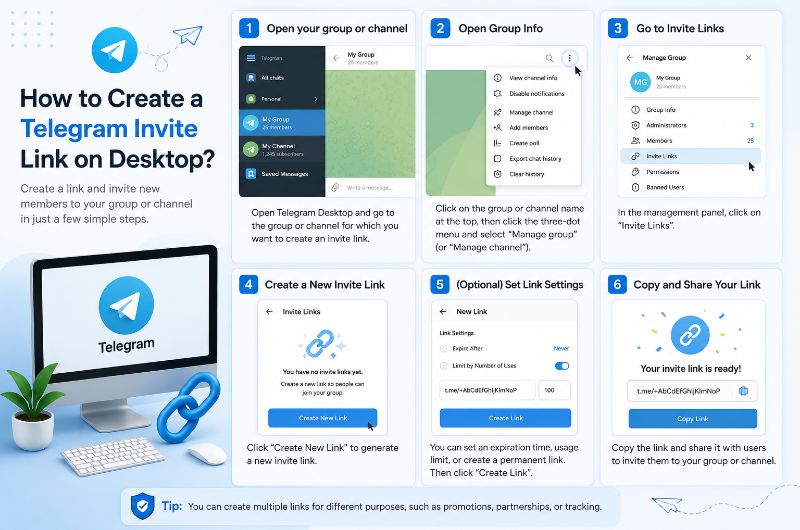
On Telegram Desktop, you can usually create or copy an invite link from the chat information or management area. The process is useful when you manage a group or channel from a computer and want to paste the link directly into a member-order form.
- Open Telegram Desktop.
- Open the target group or channel.
- Click the group or channel name at the top.
- Open Manage Group, Manage Channel, Edit, or the information panel.
- Find Invite Links or Invite via Link.
- Copy the current active link or create a new invite link.
- Avoid short expiry or tight member-limit settings.
- Paste the link into the Telegram member order form.
Desktop is especially useful for checking long links carefully. Before submitting the order, make sure you did not copy a post link, message link, bot link, or unrelated group link by mistake.
Best Invite Link Settings for Telegram Member Orders
For Telegram member orders, the invite link should be stable enough for the full delivery process. Avoid links that expire too soon, links that allow fewer joins than the order quantity, or links that require manual approval unless the selected SMM panel service clearly supports that setup.
| Setting | Best Practice for Member Orders |
|---|---|
| Expiry time | Avoid short expiry unless the service is instant and supports that timing. |
| Number of uses | Avoid low limits unless the limit is higher than the order quantity. |
| Join request | Avoid manual approval unless the service supports approval-based joining. |
| Link status | Keep the link active until the order is completed. |
| Chat visibility | Make sure new users can join through the link. |
| Admin permissions | The owner or admin must have permission to manage invite links. |
| Link target | Confirm the link belongs to the correct group or channel. |
Should You Use Expiring Invite Links for Member Orders?
Expiring invite links are useful for temporary campaigns, events, or controlled access. However, they can create problems for SMM member orders if the order starts late or delivery takes longer than expected. If the link expires before the order is complete, new members may not be able to join.
For most member orders, a non-expiring or longer-valid invite link is safer. If you use an expiring link, the expiry window should be longer than the expected start time and full delivery time combined.
Should You Use Limited-Use Invite Links for Member Orders?
Limited-use invite links can be helpful when you want to control exactly how many users can join through one link. However, for member orders, the limit must be equal to or higher than the order quantity. If you order 1,000 members but create a link that allows only 100 joins, the order cannot complete through that link.
If the service does not require tracking by link, it is usually safer to avoid tight usage limits. A low member limit may cause partial delivery, cancellation, or support review after the link stops accepting new joins.
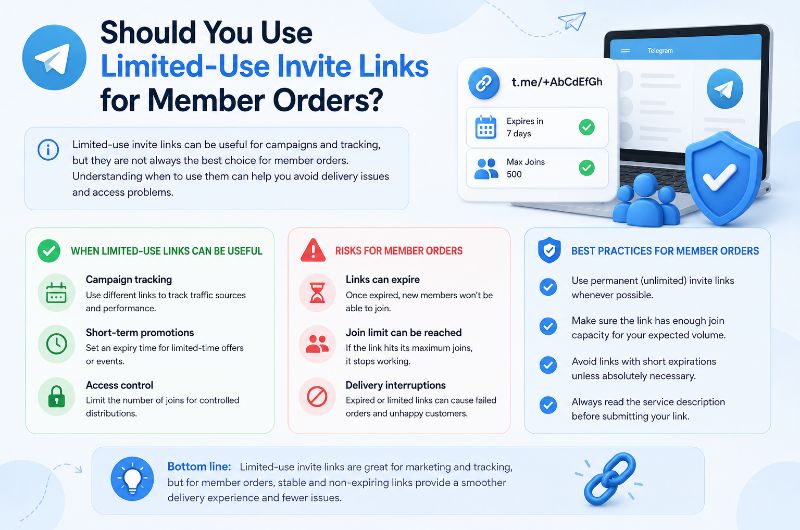
Should You Use Join Request Links for Member Orders?
Join request links can be useful when admins want to manually approve who enters a Telegram group or channel. However, they are risky for member orders because new members may not be counted as joined until the admin approves them. If approval is slow or not handled, the order may appear stuck or incomplete.
For SMM panel member orders, use a normal invite link unless the service specifically says it supports join-request links. If manual approval is enabled, keep checking requests during delivery so eligible users are not left waiting.
Invite Links for Channels, Groups, Bots and Mini Apps
Member orders usually focus on channels and groups, but Telegram campaigns can also connect to bots, referral flows, mini apps, and boost campaigns. Each one may require a different link type. A member order link is usually a group or channel access link, while bot and mini app campaigns may require a bot link, referral link, or app start link instead.
If your campaign is bot-based, buy telegram bot start services usually need the correct bot or start link, not a normal group invite link. Submitting the wrong type of link may delay or cancel the order.
Referral and mini app orders also need special attention. Services like Buy telegram Referrals start and Buy Telegram Mini App Start are not the same as basic member orders, so the submitted link should match the exact service instructions.
Common Telegram Invite Link Mistakes That Cancel Member Orders
Most invite-link problems happen before the order even starts. The user submits a link that looks correct but cannot actually be used for member delivery. This is why checking the link before ordering is much better than contacting support after the order stays pending.
| Mistake | What Can Happen? |
|---|---|
| Submitting the wrong group or channel link | The order may fail, cancel, or go to the wrong target. |
| Using an expired invite link | New members cannot join. |
| Revoking the link during delivery | The order may stop or become partial. |
| Setting a low usage limit | Delivery may stop after the limit is reached. |
| Using approval-required link | Members may wait for manual approval. |
| Changing username or link mid-order | The panel may lose access to the target. |
| Submitting a post link instead of a chat link | The member service may reject the order. |
| Removing joined members too soon | Retention and delivery tracking may become confusing. |
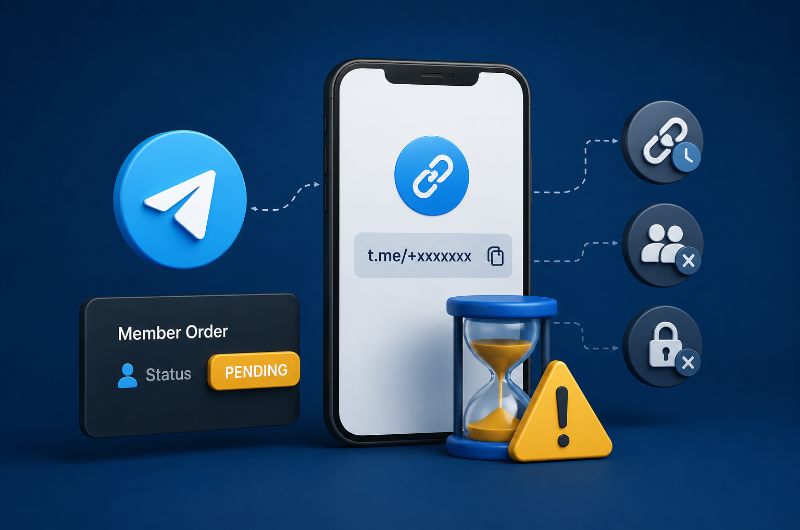
Why Telegram Member Orders Stay Pending Because of Invite Links
A Telegram member order may stay pending if the invite link cannot be used by the service. This can happen when the link is expired, revoked, approval-based, limited to fewer joins than the order quantity, copied incorrectly, or connected to the wrong Telegram group or channel.
Pending does not always mean the panel failed. It may mean the order is waiting for the service to start, or the system cannot continue because the invite link is not suitable. Users should check the link before contacting support.
What Should You Check Before Submitting the Invite Link?
Before submitting a Telegram invite link for a member order, check that the link opens correctly, belongs to the right group or channel, allows new members to join, and will remain active until the order is completed. This small check can prevent pending, partial, cancelled, or delayed orders.
- Open the invite link in Telegram or a browser to confirm it works.
- Make sure the link belongs to the correct group or channel.
- Confirm the link is not expired.
- Confirm the link has enough allowed uses for the order quantity.
- Avoid join-request links unless the service supports them.
- Do not revoke or replace the link during delivery.
- Do not change the group or channel username during delivery.
- Read the SMM panel service description before ordering.
How to Track Which Members Joined From an Invite Link?
Telegram allows admins to create different invite links for different campaigns and see which users joined through each invite link. This can help admins understand which source, campaign, or order brought members into the group or channel.
For SMM panel member orders, tracking links can be useful when you want to separate organic joins, website joins, social media joins, and paid member-order joins. However, the tracking link should still remain active and should not have settings that block delivery.

How Invite Links Support Telegram Growth Beyond Member Orders
Invite links are useful beyond a single member order. They can support channel growth, group campaigns, country-targeted promotion, referral tracking, and post-campaign analysis. When used correctly, they help admins understand where new members came from and which campaign source worked better.
Invite links can also support stronger campaign planning when combined with engagement layers such as views, reactions, shares, and buy telegram boost. The key is to keep the link stable while campaign activity is running, so the order flow and tracking data remain clean.
What Happens After Delivery?
After the member order is delivered, check the final member count, order status, invite link activity, and retention behavior. If the order is completed, the link can remain active for future joins or be revoked if it was created only for one campaign.
If the order is partial, cancelled, or delayed, check whether the invite link expired, reached its usage limit, required approval, or was changed during delivery. If the service includes refill or retention support, follow the panel’s refill rules instead of creating a new order immediately.
Final Thoughts on Telegram Invite Links for Member Orders
Creating the right Telegram invite link is one of the most important steps before placing a member order. A good link should be active, stable, connected to the correct chat, accessible to new users, and free from restrictions that block delivery. Short expiry, low usage limits, revoked links, wrong chat links, and approval-required settings can all create order problems.
The safest approach is simple: create or copy the correct invite link, test it, avoid restrictive settings, keep it active until delivery ends, and do not change the group or channel link during the order. This gives your Telegram member order a much better chance of starting and completing smoothly. ✅

FAQ About Telegram Invite Links for Member Orders
The questions below answer the most common problems Telegram admins and SMM panel buyers face when creating invite links for member orders.
How do I create a Telegram invite link for member orders?
To create a Telegram invite link for member orders, open your Telegram group or channel, go to the chat profile or management settings, open Invite Links or Invite via Link, then copy an active invite link. For member orders, use a link that does not expire too soon and allows enough joins for the order quantity.
Should I use a public Telegram link or private invite link for member orders?
Use a public Telegram link if your group or channel is public and the selected service accepts public links. Use a private invite link if the group or channel is private or not accessible through a public username. Always follow the service description before submitting the link.
Can an expired Telegram invite link cancel a member order?
Yes, an expired invite link can cause a Telegram member order to fail, stay pending, become partial, or get cancelled because new members cannot join through that link. The invite link should remain active until the order is completed.
Should I use a join-request invite link for Telegram member orders?
Usually, a normal invite link is better for member orders unless the SMM panel service specifically supports join-request links. If every join requires manual approval, delivery may be delayed or incomplete until the admin approves the requests.
What should I check before submitting a Telegram invite link?
Before submitting a Telegram invite link, check that it opens correctly, belongs to the right group or channel, is not expired, has enough allowed uses, does not require manual approval unless supported, and will not be revoked or changed during delivery.
Can I change the Telegram invite link during delivery?
You should avoid changing or revoking the invite link during delivery. If the submitted link changes before the order is completed, the service may lose access to the target chat, which can cause pending, partial, delayed, or cancelled delivery.
- Buy Telegram Members
- Buy Telegram Views
- Buy Telegram Bot Start
- Buy Telegram Boost
- Buy Telegram Story Views
- Buy Telegram Emoji Reactions
- Buy Telegram Comments
- Buy Telegram Stars
- Buy Telegram Referrals Start
- Buy Telegram Post Shares
- Buy Telegram Poll Votes
- Buy Telegram Mini App Start
- Free Telegram Members
- Free Telegram bot start
- Free Telegram Reaction
- Free Telegram View