Instant Start
Most reaction orders start within minutes of payment. With drip-feed, you set the pace yourself and the reactions land gradually.

Add reactions to any Telegram post and pick the exact emojis yourself, from a single heart to a full positive mix. As a Telegram SMM panel focused on nothing but Telegram, we cover regular reactions, premium reactions sent by Telegram Premium accounts, and auto reactions for every future post. Orders can spread across your recent posts too, and every reaction service carries a full one-year guarantee.
Emoji control
Pick your exact mix
Use one emoji or spread reactions across several positive emojis.
Order flow
Posts & Auto Reactions
Boost one post, recent posts, or every future post automatically.
You want the exact emoji, clean delivery, and coverage that lasts. These four points explain what you get when you place a reaction order here.
Most reaction orders start within minutes of payment. With drip-feed, you set the pace yourself and the reactions land gradually.
From a single heart to a full positive mix, you pick exactly what appears under your post. Most panels sell preset bundles; here the emoji list is yours.
Every reaction service is covered for a full year. If your reactions drop at any point in that period, we restore them free.
Real people answer, usually within minutes. You can ask anything before or after your order.
Pick your emoji, send your post link, and watch the reactions land. One thing to check first: the emoji you order must be enabled on your channel, and that takes ten seconds to confirm.

Step 1
Choose a single emoji or a mix, the quantity, and whether to spread it across your recent posts, old ones included.

Step 2
Reaction orders take the link of the post itself. For Auto reactions, send your channel link instead, and every future post gets covered on its own.
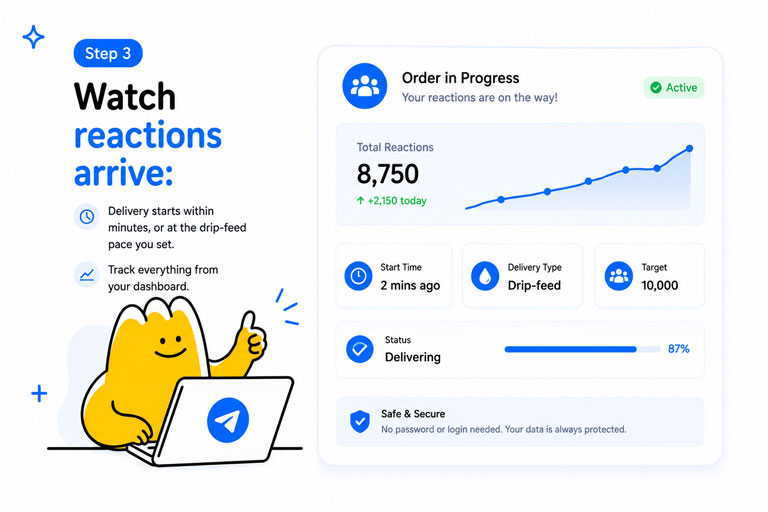
Step 3
Delivery starts within minutes, or at the drip-feed pace you set. Track everything from your dashboard.
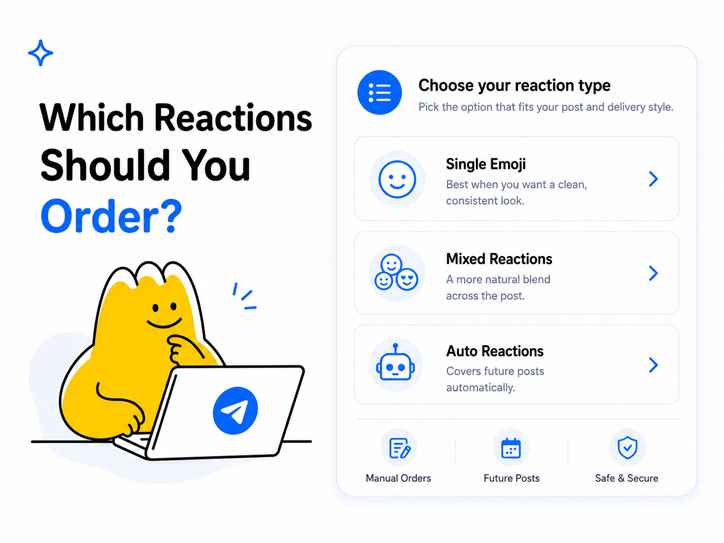
What should someone scrolling your channel see under the post?
For most posts, the Positive Mix does the work. A post carrying only one emoji type in large numbers reads as staged, while a blend of likes, hearts, and fire looks like a real crowd reacted. If you are after Telegram likes specifically, that is simply the thumbs-up reaction, and you can order it on its own, the same way the thumbs-down covers anyone looking to buy Telegram dislikes for a poll-style or debate post on their own channel.
Premium reactions change the signal, not just the count. They arrive from Telegram Premium accounts, which display differently and carry the exclusive emoji set, so crypto, business, and luxury channels use them to make engagement look upscale. The Premium Look Mix bundles the emojis that sell that image best.
If you post daily, ordering reactions by hand gets old fast. Auto reactions attach to your channel once and cover every future post with the mix you chose, the same way auto views work. Pair it with the spread option, which applies one order across up to your last 100 posts, and both your archive and everything you publish next stay consistent.
Before any order, open your channel settings and make sure the emoji you picked is enabled for reactions. If a post does not allow that emoji, the order cannot land there. It takes ten seconds to check and saves a support ticket.
Compare the three options at a glance
Use this quick comparison when you want to choose by budget, look, and how often you post.
Regular
Any emoji, lowest rate
Premium
Sent by Premium accounts
Auto
Future posts, same Regular rate
Reactions are the layer visitors actually check. A view count says people saw the post; reactions say people cared.
Reactions feed into how Telegram ranks channels and posts in its internal search, alongside members and views. A channel where posts collect reactions consistently gives Telegram a reason to surface it.
Engagement that feeds channel rankingA post with 20,000 views and two reactions tells a story, and not a good one. Reactions close the gap between how many saw the post and how many visibly responded, which is the ratio sharp visitors check first.
Balanced stats that survive a close lookReal users react more easily under a post that already carries visible engagement. The first hundred reactions are the hardest, and seeding them lowers the barrier for everyone who scrolls by after.
Momentum that keeps building on its ownCustomers use TGPanel for different Telegram growth needs, from members and views to reactions, comments, shares, boosts, and campaign support. The feedback below focuses on the things that matter across every order: simple setup, clear service notes, support, delivery tracking, and repeat use.
4.1
GreatRecorded by real TGPanel customers about their order flow, dashboard experience, support, and overall use of the panel.
 14 March
Lisa talks about browsing services, comparing options, adding balance, and placing orders without dealing with a confusing dashboard.
 7 March
Ryan explains how the service categories are organized and why the dashboard works well for repeat Telegram orders.
 14 March
Deonne shares how TGPanel helps when a project needs different Telegram services in one place instead of switching between tools.
 9 May
9 May
Kaelinsbooks describes TGPanel as useful for people who publish often and want a repeatable way to manage Telegram orders.
 28 February
Shanteria highlights the simple order flow and the fact that standard orders do not require private Telegram account access.
 11 March
Maryam explains that the service options and package sizes can be matched to different Telegram growth plans and campaign goals.
 2 September
Christopher talks about the dashboard, balance system, service list, and order tracking as the parts that make TGPanel easy to return to.
These notes are about the everyday parts of using TGPanel: choosing a service, placing the order, checking progress, understanding refill rules, and getting help when something needs a second look.
Aiden.M
I like that the service notes are clear before ordering. It makes it easier to choose the right option instead of guessing and hoping it works.
Marina.K
The panel is easy to reuse. I add balance, choose the Telegram service I need, paste the link, and follow the order from the dashboard.
Owen R.
Support helped me understand which service made sense for my group before I ordered. That saved me from choosing the wrong type.
Daniel.S
What matters to me is knowing the rules before I pay. The refill details, order status, and support replies make the process feel controlled.
If we did not answer your question below, our support team is ready to help. Open a ticket after signing in, or continue to the panel here.
Yes, that is the point of this service. Order a single emoji like the heart or fire, or pick a ready mix. The full list, from likes and dislikes to the premium set, is in the order form.
Yes. On Telegram, likes are the thumbs-up reaction and dislikes the thumbs-down, and both are in our emoji list as single options. Order them for your own posts, alone or inside a mix.
Yes. A reaction order works on any existing post, and the spread option applies one order across your last 5 up to 100 posts, old ones included.
That is the Auto Reactions service. You send your channel link once, pick an emoji mix, and every new post gets its reactions automatically, the same way auto views work.
They are sent by Telegram Premium accounts, which display differently under a post and include the premium-exclusive emoji set. Channels that want engagement to look upscale pick these.
Telegram lets channel owners limit which reactions a post accepts. If your channel blocks an emoji, our accounts cannot react with it there. Check your channel settings before ordering; it takes ten seconds.
Reactions are stable by nature, and every reaction service still carries a full one-year guarantee. If anything drops within that year, we restore it free.
Yes, with drip-feed. Set the pace yourself and the reactions arrive gradually instead of all at once, which reads more naturally on a growing channel.
Yes, any post that accepts reactions can receive them, in channels and groups both. Just make sure the emoji is enabled there.
Positive Mix fits most channels. If your posts already pull views, match roughly 3 to 5 reactions per 100 views so the ratio reads naturally. Our Telegram Growth Ratio Guide covers the numbers.
Here is a simple side-by-side look at what you get with TGPanel compared with general Telegram reaction providers.
You should know what happens if a service drops, cannot start, or cannot be delivered. These policies keep the order process simple and predictable.
If an order cannot start, is canceled, or the selected service cannot be delivered, the order amount is returned to your account balance after review.
Refunds are not used for completed orders, wrong links, private posts, deleted posts, or cases where the service has already been delivered as described.

Every reaction service on TGPanel is covered for a full year. Reactions are stable by nature, and if yours drop at any point within that period, we restore the missing amount free.
One condition applies: the emoji you order must be enabled on your channel or post at the time of the order, since Telegram blocks reactions the owner has turned off.
Reactions make posts look alive, and they land best on posts that already have views behind them. Read the Telegram Growth Ratio Guide for a cleaner strategy.
Reactions on a post nobody viewed give the game away. Views set the base that makes reactions believable.
Buy Telegram ViewsEngagement grows a channel faster when the member count matches it.
Buy Telegram MembersShares carry your reacted posts into new chats and channels, where fresh eyes find them.
Buy Telegram Post SharesOrder in under a minute. Sign up, pick your emoji and package, paste your post link, and track everything from your dashboard.